 Simplygon 10.4.132.0
Hierarchical Level-of-Detail
Hierarchical level of detail (HLOD) in complimentary method that involves the following:
- Offline grouping of large variety of meshes together (usually in close proximity) in hierarchical manner and generating proxy geometry and material.
- Rendering the hierarchical data based on a switching metric ( i.e area covered on screen or distance from camera).
Unreal Engine Specific Terms
- Hierarchical Level Of Detail levels - The hierarchy level deciding when to switch in the clusters.
- Clusters - a group of actors which are representing the source meshes fed to Simplygon when creating the proxy mesh.
When to use
- Ideal for large open worlds.
- When you have high triangle density leading in sub optimal hardware performance due to overdraw.
- When you have many objects on screen and draw submission is the bottleneck.
- When LOD switching mechanics are required.
How to enable Hierarchical LODSystem
Before using HLOD you need to enable it in World Settings. Navigate to Windows / World Settings / Enable Hierarchical LODSystem. After enabling this feature you can navigate to: Window / Hierarchical LOD Outliner in order to bring up the HLOD window below.
Hierarchical LOD Window
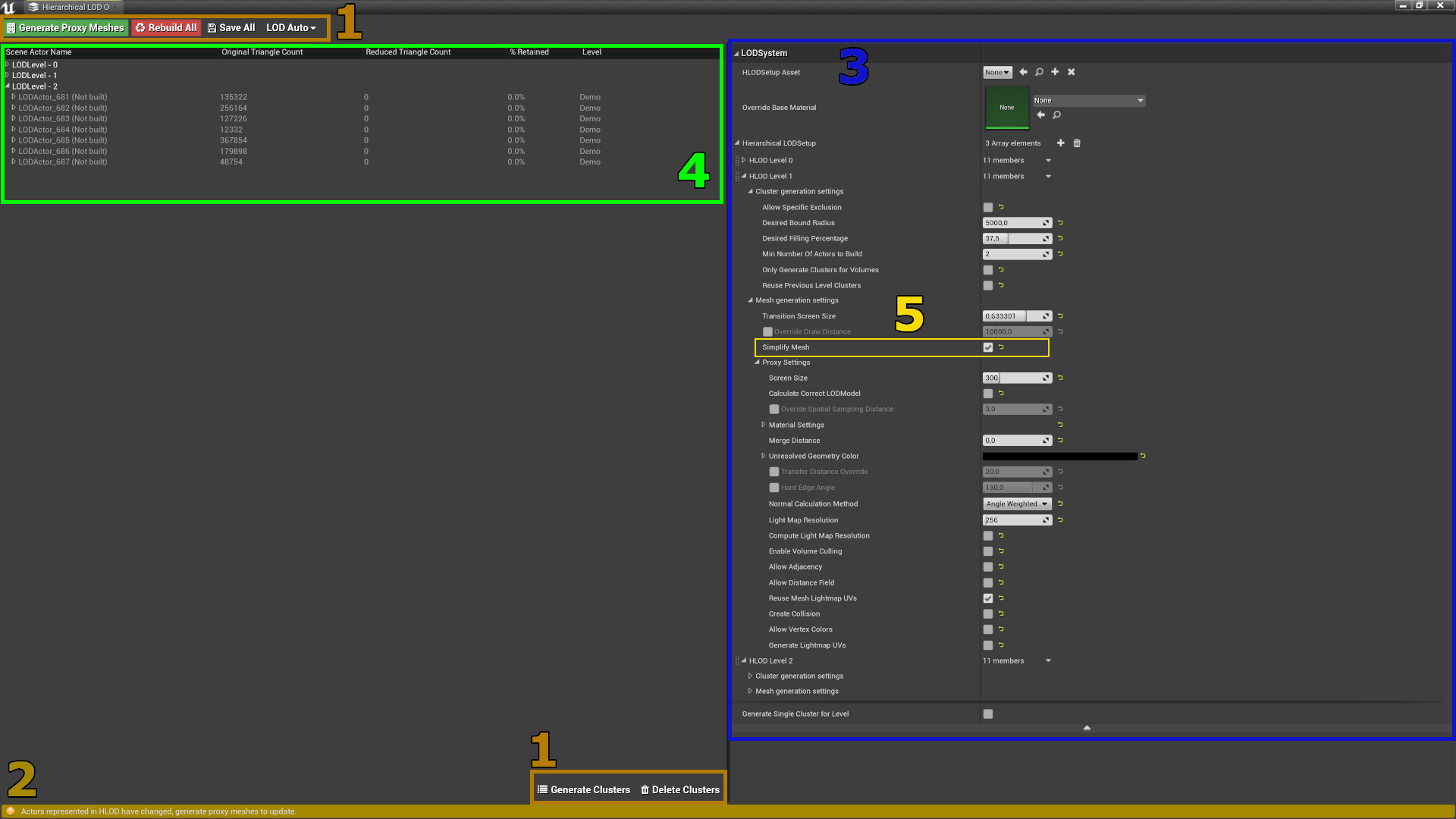
| No | Color | Description |
|---|---|---|
| 1 | —— | Hierarchical LOD Actions |
| 2 | —— | Status bar |
| 3 | —— | Settings Widget |
| 4 | —— | LODLevels/Cluster(LODActors) Scene Hierarchy |
| 5 | —— | Enable Simplygon for Proxy Generation. |
See Epic's HLOD Outliner Reference for more details.
Gotchas
Generating proxies adds cost to your texture memory budget. Depending on your implementation of HLOD system you need to strike a balance in the number of HLOD level.
Tips
To minimize pops rendering engines can use the following techniques:
- Screen door fading: a screen space technique where a dither pattern is used to blend between LODs when switching.
- Geomorphing: a techniques that requires an extra set of UV coordinate to blend between the vertices of LODs.
To generate better clusters:
- Use HLOD Volumes and for building assets and generate cluster generation based on only volumes. i.e. Metropolises
- If you have a Landscape Actor in your level. Enable landscape culling to clip away back facing triangles. This also allows for better usage of texture space for baked material.