 Simplygon 10.3.6400.0
Stand-In: Material baking
Run material baking for a static mesh with the following needs:
- 2k texture resolution
- Base Color and Normal maps
1. Choose material channels to bake
You set what material channels to bake using the material property casters array, which you can find under Pipeline → Settings → Material Property Casters.
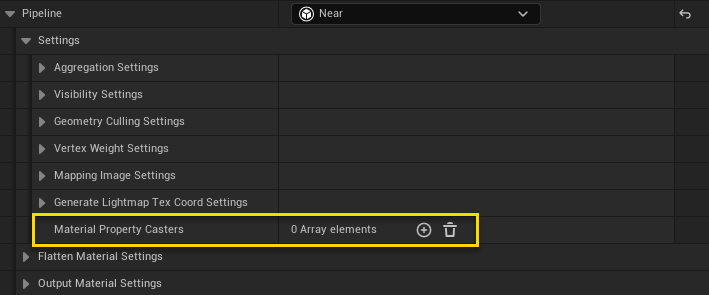
In this example we wanted Base Color and Normal. Add these casters to the Material Property Casters array.

Note
Material baking is enabled by adding casters and disabled by removing all casters.
2. Choose texture resolution
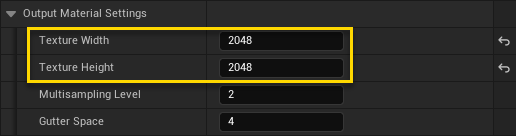
You can set texture resolution (among many other valuable material related settings) under Mapping Image Settings. Go to Mapping Image Settings → Output Material Settings → Index [ 0 ]. Set Texture Width and Texture Height to 2048.
3. Build
Build and wait for the process to finish.
4. Result
After the build, the baked material is automatically assigned to the resulting mesh.