 Simplygon 10.3.6400.0
LOD Recipe: Use vertex color as vertex weights
Enable Vertex weights to influence the reduction process by setting weights on the vertices of the geometry. A higher vertex weight value will instruct the reducer to give more importance to preserve the vertex.
Prerequisites:
- A Static mesh with a vertex color channel.
INFO
Vertex weight is only supported for Reduction and Aggregation pipelines.
1. Enable Vertex Weights
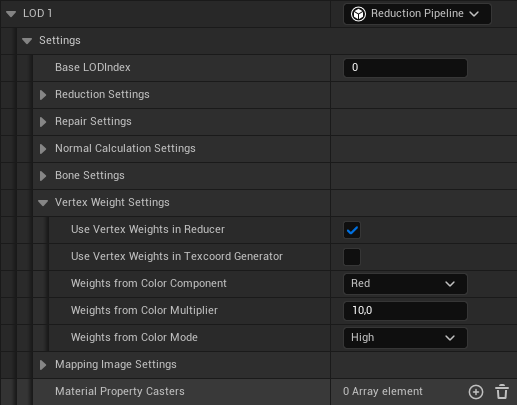
Inside the LOD Recipe, locate the Vertex Weights Settings for your LOD. You can find it under Settings → Vertex Weights Settings.
Check the "Use Vertex Weights in Reducer" checkbox and select color component via "Weights from Color Component" combobox to enable Vertex Weight influence on the reduction.
2. Build
Once you're done setting all the LOD Recipe settings, press build and wait for the process to complete.