
Skinning data
The Simplygon API now provides the user to add skinning information per-vertex. The skinning data is kept intact when performing reduction. The API also provides the ability to reduce bones and generate new skinning data based on the reduction. For more on how to use bone reduction see the section about bone reduction settings or the bone reduction example.
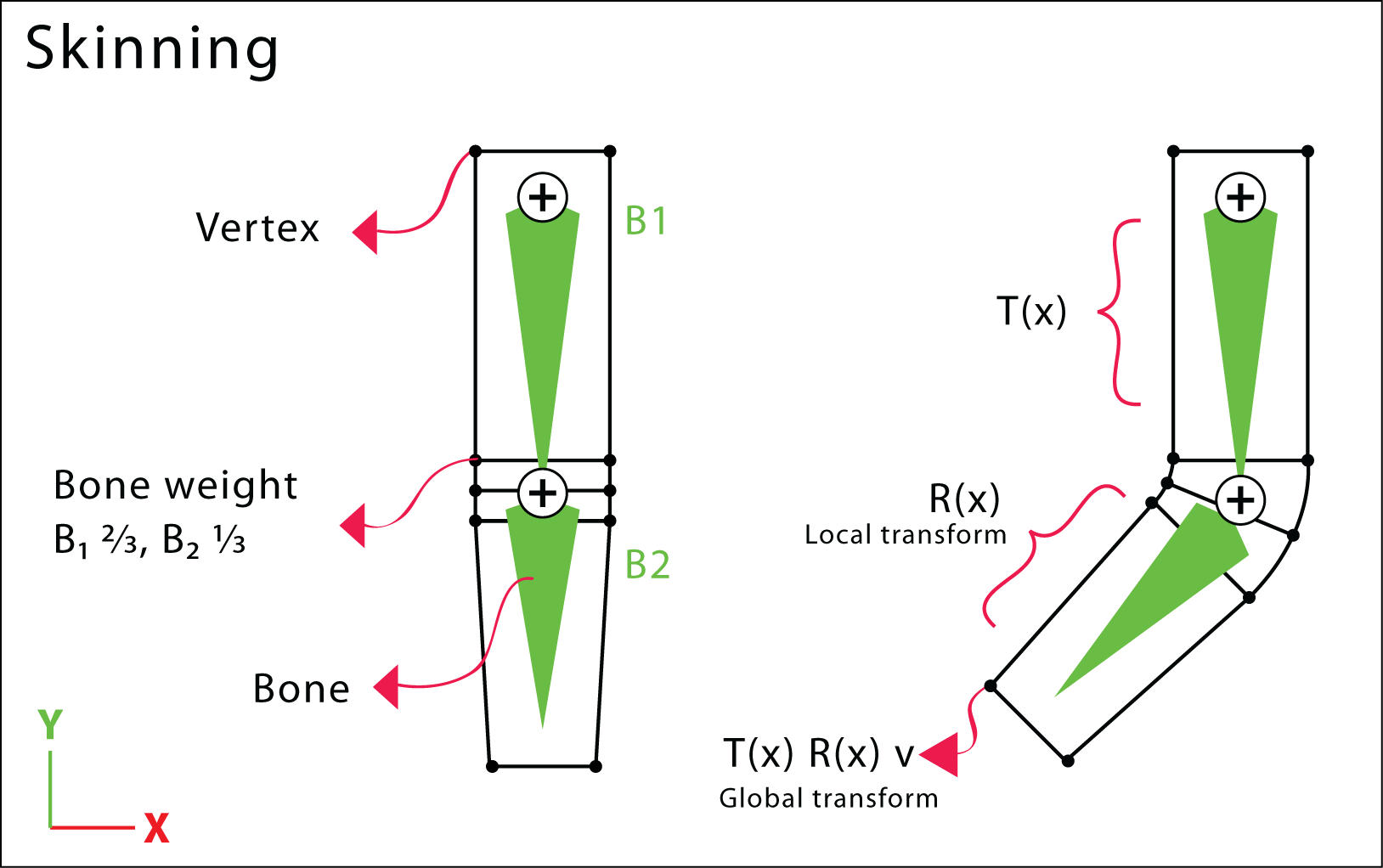
Smooth skinning
Simplygon API provides support for smooth skinning. Two new fields have been added to the GeometryData class for skinning purposes. These two fields are the BoneIds and BoneWeights. The figure above shows how smooth skinning works.
Bones
To add skinning information in GeometryData use the AddBoneWeights. The method takes the tuple size which should be equal to the number of bones influencing a vertex. The API allows a vertex to be influenced by a maximum of four bones. Calling AddBoneWeights also creates the BoneIds field with the same tuple size. The bone ids field contains integer ids. The bone weights field can accept floating point values. Set the bone id and bone weight to -1 and 0 respectively if the tuple is not used. Bone setup is provided through the Simplygon scenegraph see SceneBone documentation.
Example - How to use skinning data
void AddBoneToGeometryData(spGeometryData geom)
{
    // Add bone weights to geometry data (per vertex).
    // Up to two bones can influence each vertex.
    geom->AddBoneWeights(2);
    spRealArray BoneWeights = geom->GetBoneWeights();
    spRidArray BoneIds = geom->GetBoneIds();

    unsigned int vertexCount = geom->GetVertexCount();

    // Build bone weight and id data in bulk.
    std::vector<real> weightData( vertexCount * 2 );
    std::vector<rid> idData( vertexCount * 2 );
    for( unsigned int v = 0; v < vertexCount; ++v )
    {
        weightData[ v * 2 + 0 ] = 0.5f;
        weightData[ v * 2 + 1 ] = 0.5f;

        idData[ v * 2 + 0 ] = 0;
        idData[ v * 2 + 1 ] = 0;
    }

    // Set all data at once.
    BoneWeights->SetData( weightData.data(), vertexCount * 2 );
    BoneIds->SetData( idData.data(), vertexCount * 2 );
}void AddBoneToGeometryData(spGeometryData geom)
{
// Add bone weights to geometry data (per vertex).
// Up to two bones can influence each vertex.
geom.AddBoneWeights(2);
spRealArray BoneWeights = geom.GetBoneWeights();
spRidArray BoneIds = geom.GetBoneIds();
uint vertexCount = geom.GetVertexCount();
// Build bone weight and id data in bulk.
float[] weightData = new float[vertexCount * 2];
int[] idData = new int[vertexCount * 2];
for (uint v = 0; v < vertexCount; ++v)
{
weightData[v * 2 + 0] = 0.5f;
weightData[v * 2 + 1] = 0.5f;
idData[v * 2 + 0] = 0;
idData[v * 2 + 1] = 0;
}
// Set all data at once.
BoneWeights.SetData(weightData, vertexCount * 2);
BoneIds.SetData(idData, vertexCount * 2);
}def AddBoneToGeometryData(geom):
# Add bone weights to geometry data (per vertex).
# Up to two bones can influence each vertex.
geom.AddBoneWeights(2)
BoneWeights = geom.GetBoneWeights()
BoneIds = geom.GetBoneIds()
vertex_count = geom.GetVertexCount()
# Build bone weight and id data in bulk.
weight_data = [0.5, 0.5] * vertex_count
id_data = [0, 0] * vertex_count
# Set all data at once.
BoneWeights.SetData(weight_data, vertex_count * 2)
BoneIds.SetData(id_data, vertex_count * 2)