
Mapping image
Overview
The Mapping image is a texture-like structure that maps each point on a geometry to a point on another geometry. The processors in Simplygon generate mapping images between the original models and their LODs to be able to cast all the original materials and properties to the corresponding point on the generated mesh.
The mapping images can either be used manually to lookup geometry info, or used as input to material casters.
Mapping images can be generated by the most processors by enabling the relevant MappingImageSettings, and also by using the SurfaceMapper tool.
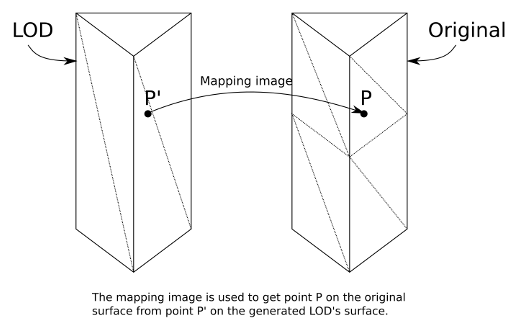
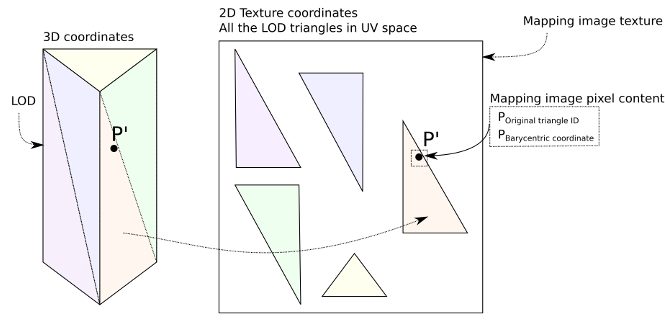
For most cases the mapping image is based on new texture coordinates generated by the same processing object that is creating the mapping image. The image contains per pixel references to the original triangle ID and the barycentric coordinate of the corresponding point on the original object's surface.
Manual lookup on mirrored meshes
Mapping-image barycentrics use the combined source geometry's corner order. Combining a scene bakes each mesh's global transform and preserves facing. For a mirrored global transform (a negative 3x3 determinant), this reverses winding without changing triangle IDs or valid quad flags.
When using MappingImageMeshData to look up attributes on an unchanged original mesh, first find its local triangle ID and check the global transform and quad flags from the time the mapping image was generated. Convert the barycentric weights as follows, using zero-based component indices:
| Original triangle | Components to swap for a mirrored mesh |
|---|---|
| Standalone triangle | 1 and 2 |
| First triangle of a quad | 0 and 2 |
| Second triangle of a quad | 0 and 1 |
For example, weights (0.2, 0.3, 0.5) on a mirrored standalone triangle become (0.2, 0.5, 0.3) before interpolating the original mesh's UVs or positions. Transform an interpolated local position by the original global transform to obtain its world-space position.
Alternatively, make a copy of the original geometry and call ChangeWinding() on the copy when its original global transform is mirrored. Its corner order then matches the combined source, so no weight conversion is needed. The manual mapping-image casting example uses this approach.
Do not apply either conversion to non-mirrored meshes, data already in combined corner order, or built-in material casters. Built-in casters use the combined source snapshot and handle its corner order internally.
See also
Parameterizer
To create the new and unique texture coordinates.Chart aggregator
To create the texture coordinates based on the original texture coordinates.Material casters
Casts materials using the mapping image